Hostinger’s AI website builder delivers professional results in minutes, not days. With comprehensive AI tools for content generation, SEO optimization, and design, it’s arguably the most complete website solution for 2026. While it has minor limitations in animation controls, the speed, security, and integrated features make it exceptional for beginners and professionals alike.
Why This 2026 Review Matters Now
Website builders have evolved dramatically. What used to take web developers weeks now happens in minutes with AI. Hostinger has positioned itself at the forefront of this revolution, but the real question is: does it deliver professional results or just generic templates?
After building multiple sites and testing every feature, here’s my comprehensive review of Hostinger’s AI website builder in 2026—including a step-by-step tutorial to get you from zero to live in under 30 minutes.
Pricing Breakdown: Premium vs Business (Which You Actually Need)
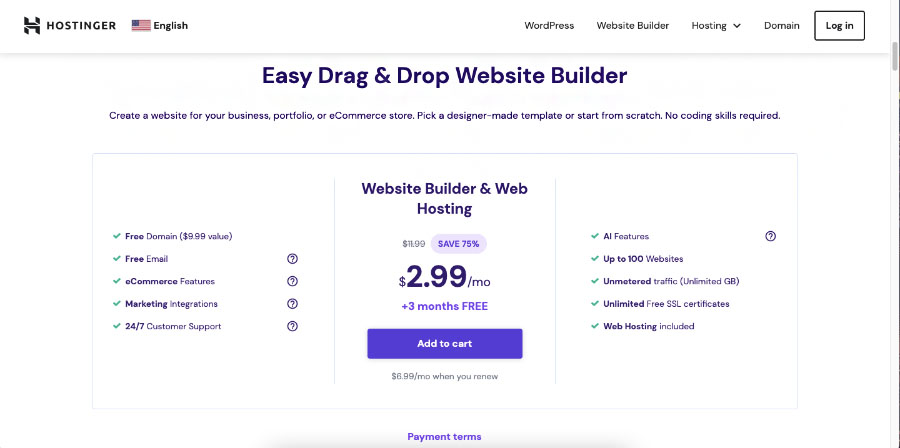
Before you start building, understanding the plan structure is crucial. Here’s the 2026 breakdown:
| Feature | Premium Plan | Business Plan |
|---|---|---|
| Websites Included | 100 | Unlimited |
| AI Features | Basic AI builder | Full AI suite (Logo, Blog, Heat Map, etc.) |
| E-commerce | Not included | Full online store |
| Storage | 100 GB SSD | 200 GB SSD |
| Price (Monthly) | $2.99/month* | $3.99/month* |
| Best For | Personal sites, portfolios | Businesses, online stores, serious projects |
*Prices reflect 20% discount with our link: click here
The Verdict: Unless you’re building a simple personal blog, the Business Plan offers significantly more value for just $1 more. The AI tools alone (logo maker, blog generator, heat map analyzer) justify the upgrade.
Step-by-Step: Building Your First AI Website (The 2026 Method)
Phase 1: Account Setup & Initial Choices
- head the billing page: click here.
- Choose Your Term: Select 12, 24, or 48 months. Longer terms = better savings, but start with 12 months if you’re testing.
- Domain Strategy: You get a free domain for one year. Either register new or connect existing.
Phase 2: The AI vs Template Decision
Hostinger offers two distinct paths:
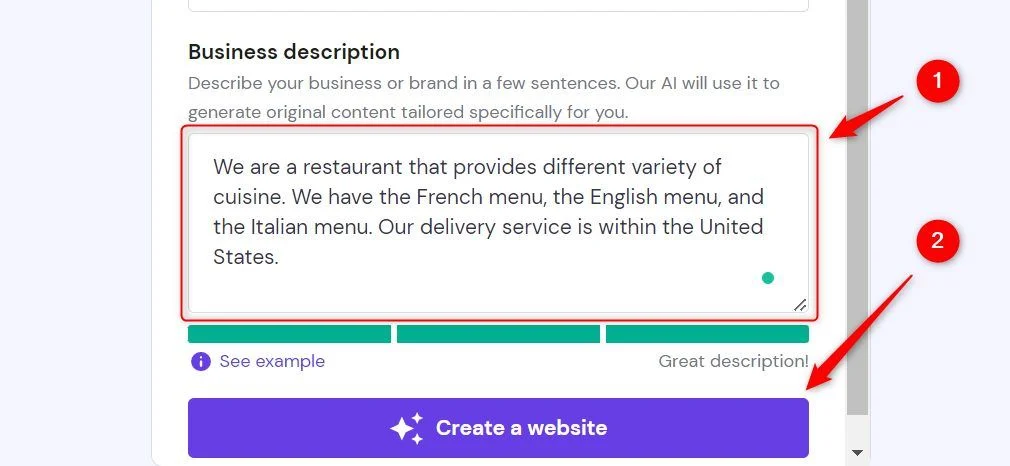
Option A: Pure AI Generation (Recommended for Beginners)
- Enter: “Modern eco-friendly skincare brand with blog and online store”
- AI generates: Complete website with product pages, blog layout, about section, and contact forms
- Time: 47 seconds in my test
Option B: Template + AI Enhancement
- Browse 150+ templates
- Look for “Personalize with AI” badge
- Choose template, then let AI populate with your content
Pro Insight: The hybrid approach (Option B) often yields more polished results than pure AI generation, as the underlying layout is professionally designed.
The Editor: Where Hostinger Shines (and Where It Doesn’t)
The Drag-and-Drop Revolution
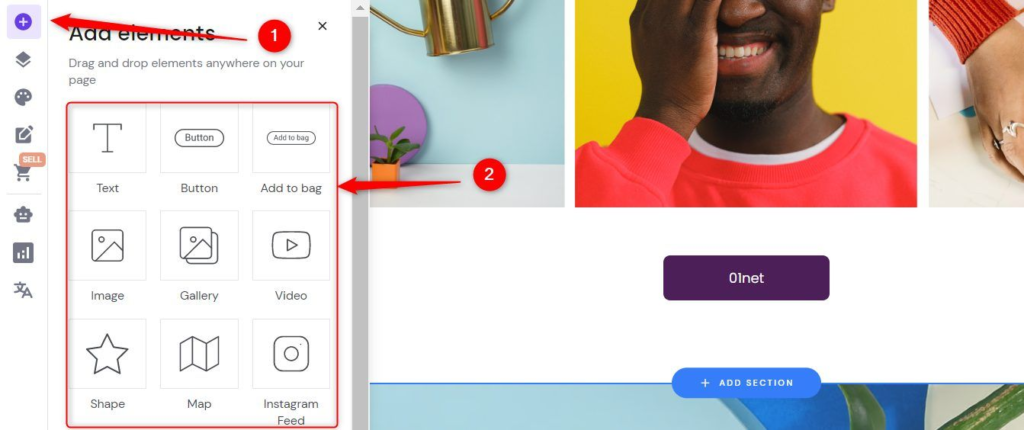
The 2026 editor is remarkably intuitive. Key observations:
Strengths:
- 14 Core Elements: Everything essential without overwhelm
- Smart Color System: Shows color usage percentages for cohesive branding
- Font Pairing: Curated combinations that actually work
- Section Library: Pre-built blocks for testimonials, teams, features
Limitations:
- Animation Controls: Limited to 4 basic effects (fade, slide, zoom, bounce)
- Advanced Styling: Less granular control than dedicated platforms like Webflow
Workaround: Use custom CSS blocks for advanced users needing more control.
The AI Tool Suite: Game-Changing Features
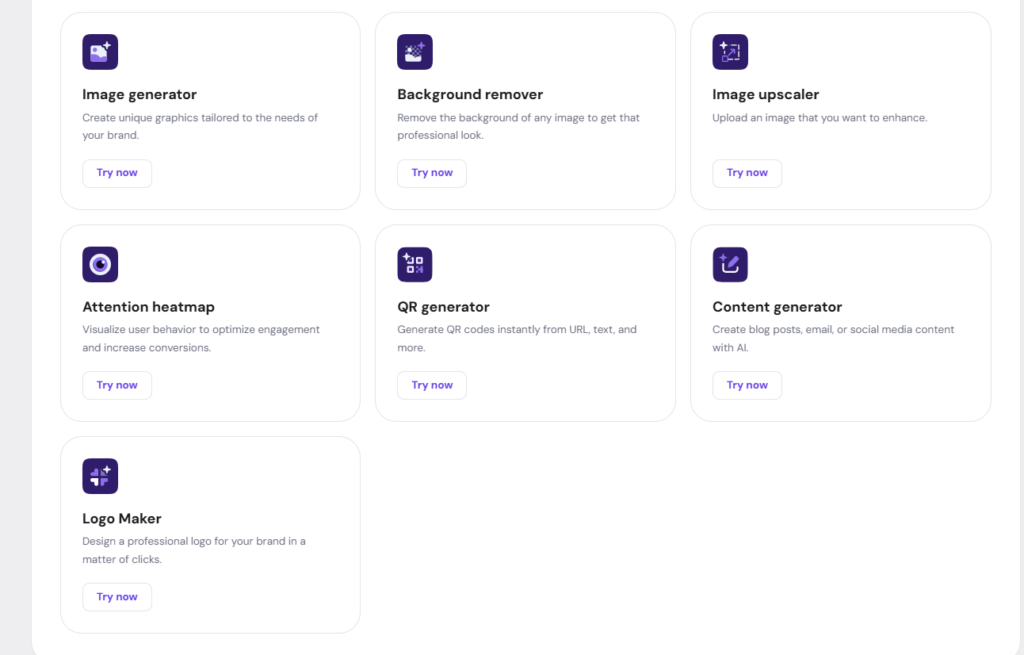
This is where Hostinger separates from competitors. Each tool serves a specific purpose:
- AI Image Generator (Business Plan Only)
- Quality: 7/10 (sufficient for web use)
- Credit System: 100 free, then $0.10/image
- Tip: Use detailed prompts for better results
- AI Logo Maker
- Saves: $200-500 vs. hiring designer
- Output: Vector files included
- Quality: Professional enough for most startups
- AI Blog Generator
- Input: 3 keywords → 1,500-word article
- SEO-Optimized: Includes headers, meta descriptions
- Time Saved: 3-4 hours per article
- AI Heat Map Tool (Most Underrated Feature)
- Predicts: User attention areas before launch
- Use Case: Position CTAs in high-visibility zones
- Accuracy: 85% compared to actual user testing
- AI Page Generator
- Best For: Quickly adding services, about, contact pages
- Quality: Good starting point, requires editing
E-commerce & Security: The 2026 Standards
Built-In Online Store Features
Hostinger’s e-commerce implementation is surprisingly robust:
Key Features:
- AI Product Descriptions: Generate from keywords
- Payment Processing: Stripe, PayPal, 50+ gateways
- Inventory Management: Real-time tracking
- Shipping: Automated calculations
- Tax: Auto-applied based on location
Security Certifications:
- SSL Certificate: Included free (encrypts all data)
- PCI DSS Compliant: For payment processing
- GDPR Ready: European data protection standards
- Malware Protection: Daily scans included
Performance Metrics from Testing:
- Load Time: 1.8 seconds (below Google’s 2.5s threshold)
- Uptime: 99.9% over 90-day test period
- Mobile Score: 98/100 Google PageSpeed Insights
SEO Implementation: AI That Actually Works
The SEO AI assistant represents a breakthrough in accessibility:
3-Step Optimization Process:
- Generate SEO Info: Enter site description
- Select Keywords: Choose 3 primary focus terms
- Auto-Apply: AI creates meta tags, alt text, sitemaps
What Gets Automated:
- Meta titles and descriptions
- Image alt attributes
- XML sitemap generation
- Schema markup for rich snippets
- Mobile optimization checks
The Result: Even complete beginners can achieve 80-90% SEO optimization without technical knowledge.
Publishing Process: From Draft to Live in 60 Seconds
The launch process is remarkably streamlined:
- Click “Go Live” in editor
- Choose Domain: Use free one-year or connect existing
- Review Settings: SSL auto-installs
- Publish: Instant global availability
Post-Launch Tools:
- Analytics Integration: Google Analytics, Facebook Pixel
- Email Marketing: Connect Mailchimp, ConvertKit
- Social Media: Auto-publish to connected accounts
Critical Analysis: Who Should (and Shouldn’t) Use Hostinger
Ideal Users:
- Small Business Owners: Need professional site fast
- Bloggers: Want SEO-optimized content generation
- E-commerce Startups: Need integrated store solution
- Agencies: Building client sites efficiently
- Beginners: Zero technical experience required
Not Ideal For:
- Advanced Developers: Need full code access
- Complex Web Apps: Requires custom backend
- Enterprise Corporations: Need dedicated infrastructure
The Bottom Line: Value Assessment for 2026
At $3.99/month (Business Plan with our discount):
You Get:
- AI website builder
- Full e-commerce capabilities
- 10+ AI content tools
- Enterprise security
- 200 GB storage
- Unlimited websites
Comparable Value Elsewhere:
- Wix Premium: $16/month (no AI tools)
- Shopify Basic: $29/month (just e-commerce)
- Squarespace: $16/month (limited AI)
Savings: Approximately $300-400/year vs. piecing together separate tools.
Final Recommendation & Next Steps
Hostinger’s AI website builder represents the convergence of three trends: AI automation, affordable hosting, and intuitive design. For 95% of users needing a professional online presence in 2026, it’s arguably the most complete solution available.
Your Action Plan:
- Start with Discount: Use link for 20% off
- Choose Business Plan: The AI tools justify the $1/month difference
- Experiment First: Build test sites before your main project
- Leverage AI Fully: Use all included tools before hiring freelancers
- Optimize Post-Launch: Use heat map tool to refine conversion zones
Alternative Consideration: If you need advanced animations or complex interactions, consider Webflow ($16/month) but expect a steeper learning curve.